Run your secondary school from one place.
EduManage keeps every learner's fees, marks, report cards, attendance and family contacts together. The bursar, the Director of Studies and the head teacher finally work from the same numbers.
Built in Uganda for private O-Level and A-Level schools. Follows the NCDC lower secondary curriculum and UNEB grading.
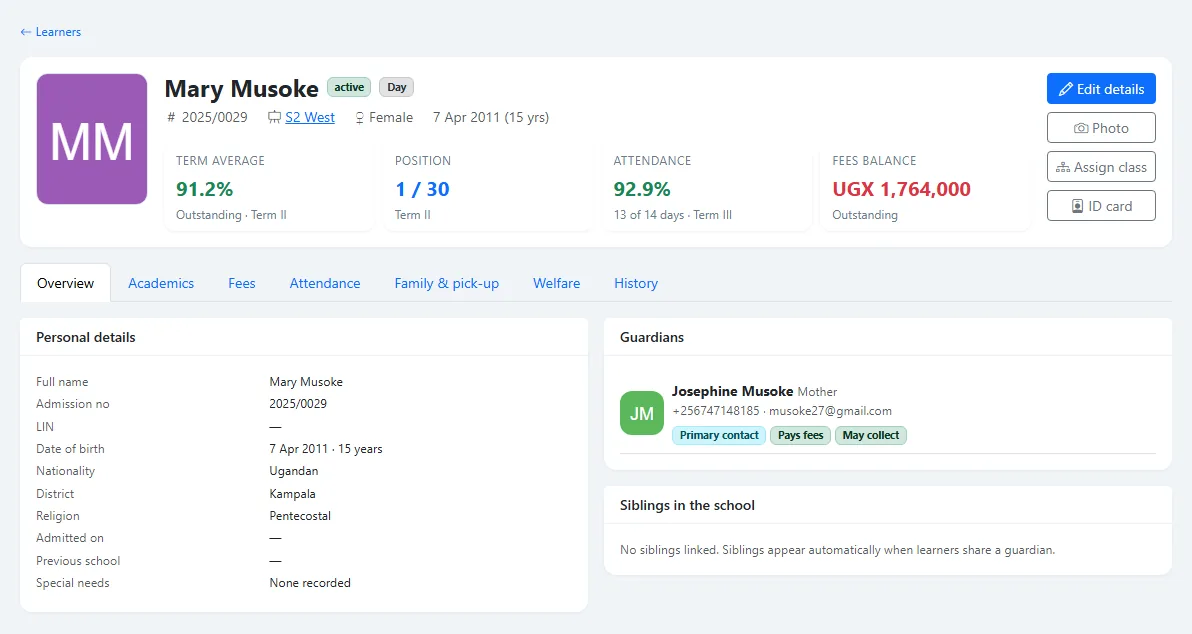
Term III ends on 4 December. Set EduManage up over the holiday and open Term I 2027 with it.
Plan your switchWhat each person in your school gets
One system, but everyone sees the part that is theirs. Teachers never see the fees ledger, and parents only ever see their own children.
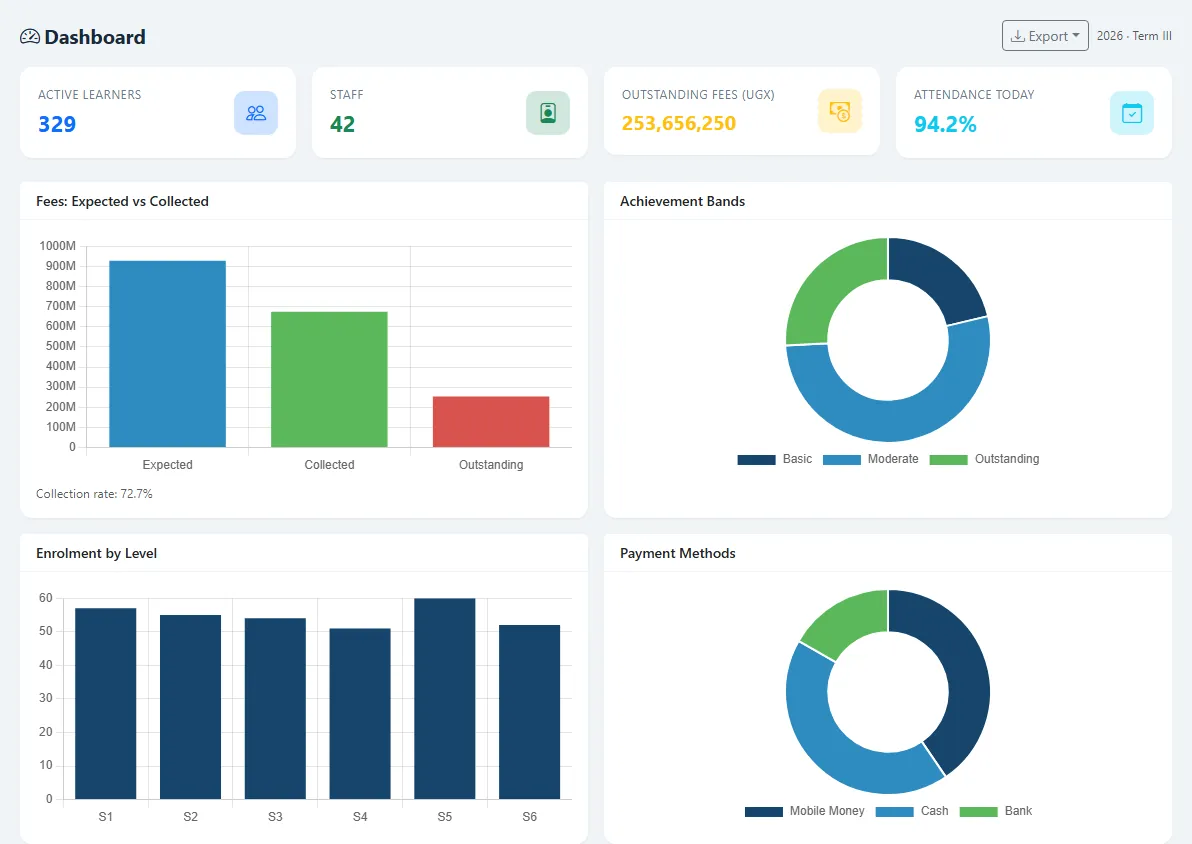
The whole school at a glance
- Learners, staff, fees collected and today's attendance on one dashboard.
- Expected, collected and outstanding fees for every term, by class.
- Every change recorded: who changed a mark, a payment or a learner, and when.
- Staff only reach what their role allows.
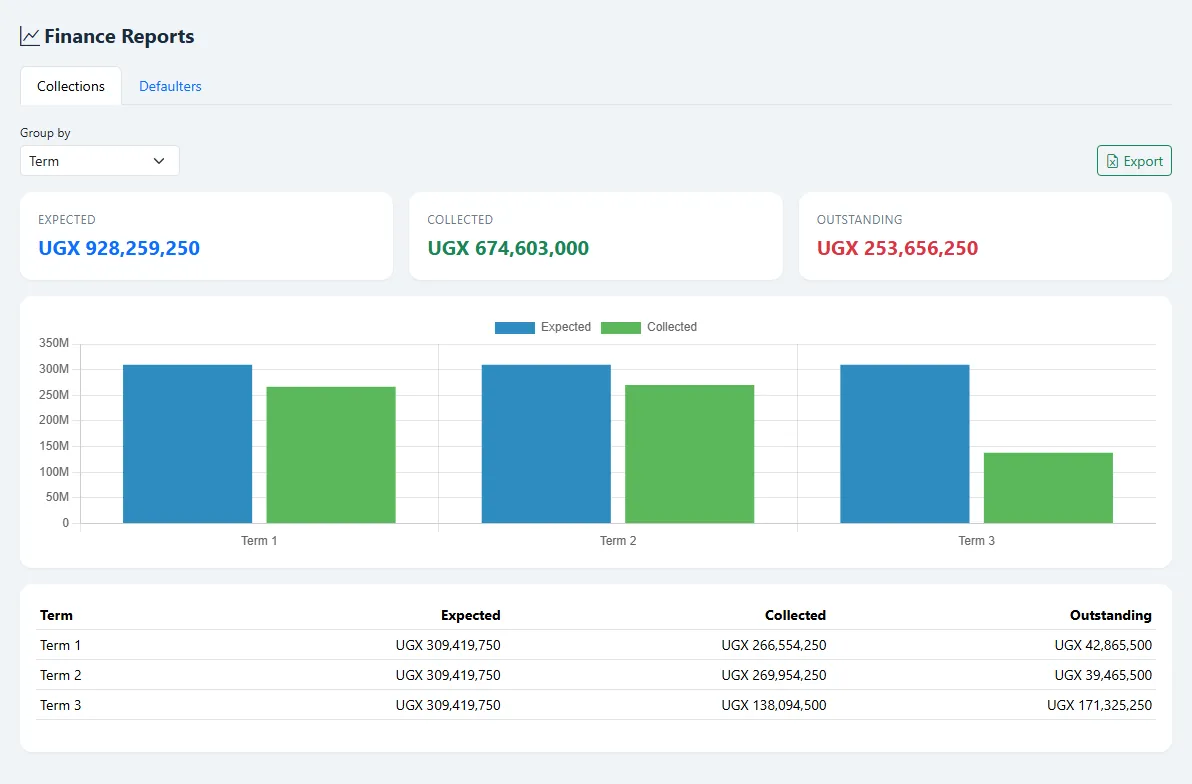
Know who has paid, in seconds
- Fee structures per class and term, for day and boarding learners.
- Invoices for a whole class at once, with bursaries and sibling discounts applied.
- Record cash, bank, cheque and mobile money payments and print a numbered receipt.
- Defaulters list and collections by term, exported to Excel.
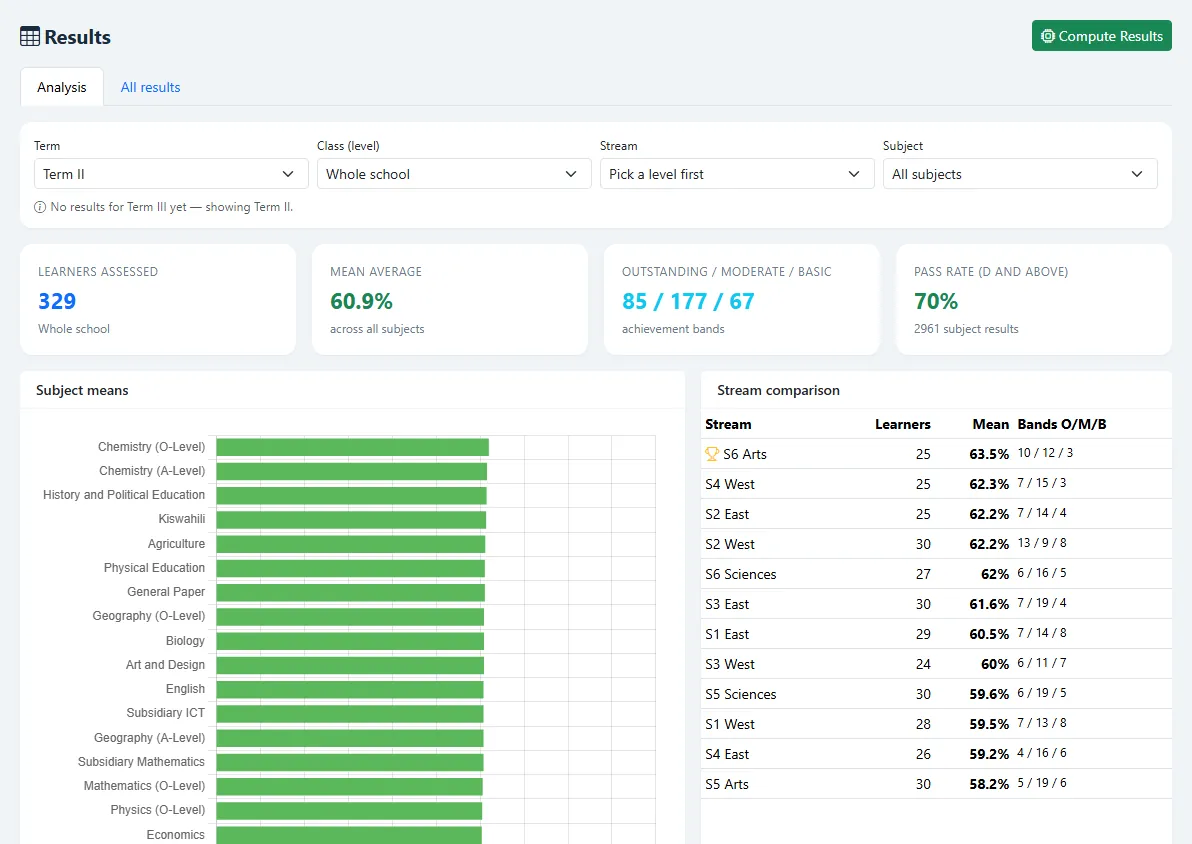
Marks in, report cards out
- Teachers enter marks only for the classes and subjects they teach.
- You approve each mark sheet; approved marks are locked.
- Results computed with the NCDC 20/80 weighting and UCE or UACE grading.
- Analysis by class, stream and subject, with the best and weakest learners named.
Less paperwork for teachers
- My Schedule shows today's lessons and the week, straight from the timetable.
- A marks grid for each class, with a remark per learner that prints on the report card.
- Class teachers see their class: register, averages and positions.
- Works on a phone browser, so marks can go in from the staff room.
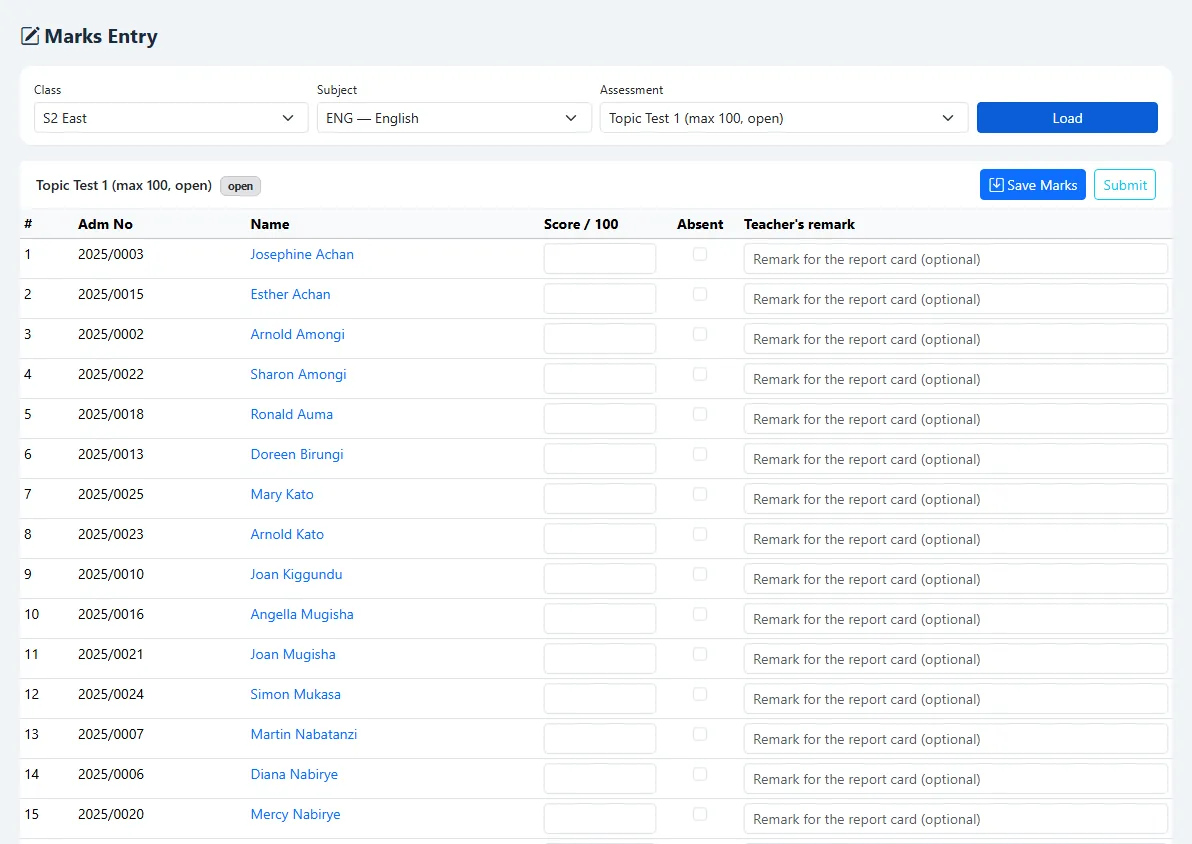
A report card that follows the new curriculum
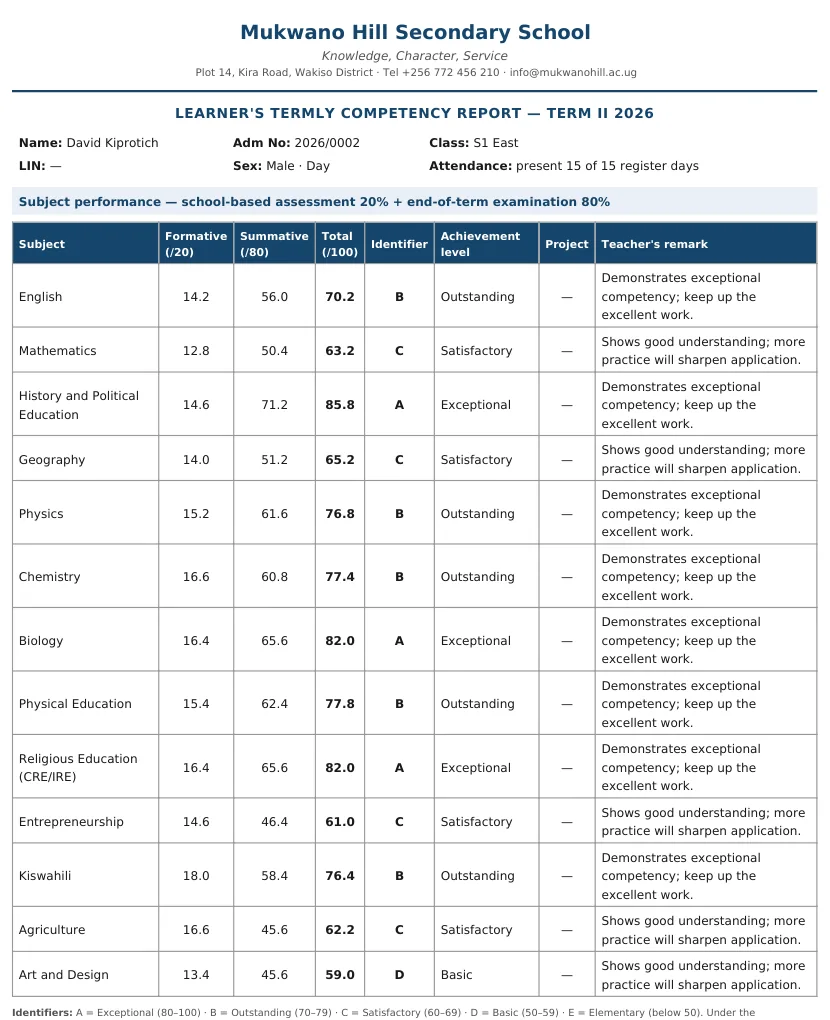
Printed straight from the marks your teachers entered. No retyping into Word at the end of term.
What is in EduManage today
Everything below works now, in the demo school you can open from this page.
Learners and families
- Admission, learner profiles with photos
- ID cards with a QR code the gate can scan
- Parents and guardians linked to all their children
- Visitation cards and written pick-up permission
- Import your existing lists from Excel
Academics
- NCDC subjects and A-Level combinations preloaded
- Teaching allocations, imported from a template
- Marks entry, submission, approval and lock
- UCE and UACE grading, positions
- Report cards as PDF, results analysis
Fees
- Fee structures, day and boarding
- Invoices, bursaries, sibling discounts
- Payments with printed receipts
- Statements, defaulters, collections
- Every list exports to Excel
Daily running
- Daily class registers
- Timetable generator with clash checks
- Each teacher's own day and week
- Discipline, sick bay, library and stores records
Control and safety
- Roles: head, DoS, bursar, teacher, parent
- Audit trail of every change
- Nightly backups
- Your school's data kept separate from every other school
Parents
- A login to see their own children only
- Results and published report cards
- Current fees balance
Not in EduManage yet
Collecting fees directly from MTN or Airtel Mobile Money, SMS messages to parents, payroll, and a parent mobile app. Payments made by mobile money are recorded by the bursar today. Tell us which of these matters most to your school; our first schools decide what we build next.
How your school gets started
- A 30-minute demoAt your school or online, using your own questions about fees, marks and reports.
- Send us your listsLearners with parents, staff and subjects, in our Excel templates or the files you already keep.
- We set it up with youClasses, fee structures, subjects and the timetable, then one training day for staff on site.
- Run the termSupport on WhatsApp and phone from the team that built EduManage.
Pricing per term, in shillings
One price covers every module, every staff login and every parent login. Setup, data import and training are included.
Founding school offer
For the first 5 schools that start with us.
for your first term, whatever your size
- We import your learners, parents, staff and fees
- Training day for your staff at the school
- 25% off the standard price for the rest of 2027
- A direct line to the developers
| School size | Per term |
|---|---|
| Up to 300 learners | UGX 300,000 |
| 301 to 700 learners | UGX 500,000 |
| More than 700 learners | Quoted for you |
Counted on active learners. Pay for three terms at once and take 10% off. No setup fee, no charge per staff member, and you can export all your data to Excel at any time.
Questions schools ask us
Do we need a computer lab or a server?
No. EduManage runs in the web browser on any computer, tablet or smartphone with internet. We host it and back it up every night.
We already keep records in Excel or another system. Do we start again?
No. We import your learners with their parents, your staff, subjects and teaching allocations from Excel. If your current system can export to Excel, we can bring that data across.
Can a teacher change marks after they are approved?
No. Once the Director of Studies approves a mark sheet it is locked. Reopening it is recorded, and every change to a mark keeps the old and new value with the name of the person who made it.
Does it follow the new lower secondary curriculum?
Yes. Marks are split into formative (20%) and summative (80%), each subject gets an identifier from A to E with its achievement level, and report cards include generic skills and values. A-Level results use UACE points.
Who owns our data?
Your school does. Any list in EduManage can be exported to Excel, and if you leave we hand over a full export. Each school's records are kept apart from every other school's.
What can parents see?
Parents you give a login to see only their own children: results, report cards once you publish them, and the fees balance. They never see other learners.
Can parents pay fees through EduManage?
Not yet. Today the bursar records each payment, including mobile money, and prints the receipt. Direct Mobile Money collection is on our list; if it matters to you, tell us during the demo.
Book a free demo
Tell us where to find you. We will call within one working day to agree a time, at your school or online. There is no commitment.
Want to look around first? Open the demo school and sign in with the demo account shown there.